












Skip to content
UnleashX
Login

WORKFLOW AUTOMATION · A WORKFORCE CAPABILITY

Move work forward. Without chasing every step.

Connect events, approved actions and exception handoffs so a process finishes without someone shepherding each step.

See it at work
Autonomous within scopeConnected to business systemsPeople own exceptions

FROM INTERACTION TO OUTCOME

An event should start the right work, once.

Explore an activation event that creates an onboarding task. Inspect eligibility and duplicate checks, then switch to a timeout to see why an unknown write result needs reconciliation rather than a blind retry.

UnleashX at workWorked example
EVENT → BUSINESS ACTION
1Activation event
2Eligibility & duplicate check
3Create onboarding task
4Verified task & owner
Example reference: ACTIVATION-204
BEHIND THE EXPERIENCE

Receive event

Capture the event reference and the affected account.

Work state

Event received · not processed

Current owner

AI employee

Routine actions proceed autonomously within configured permissions. Completion is reported only after the system result is verified.

Stage 1 of 4 · Receive event

INSIDE THE BUILDER

Design how work gets done.

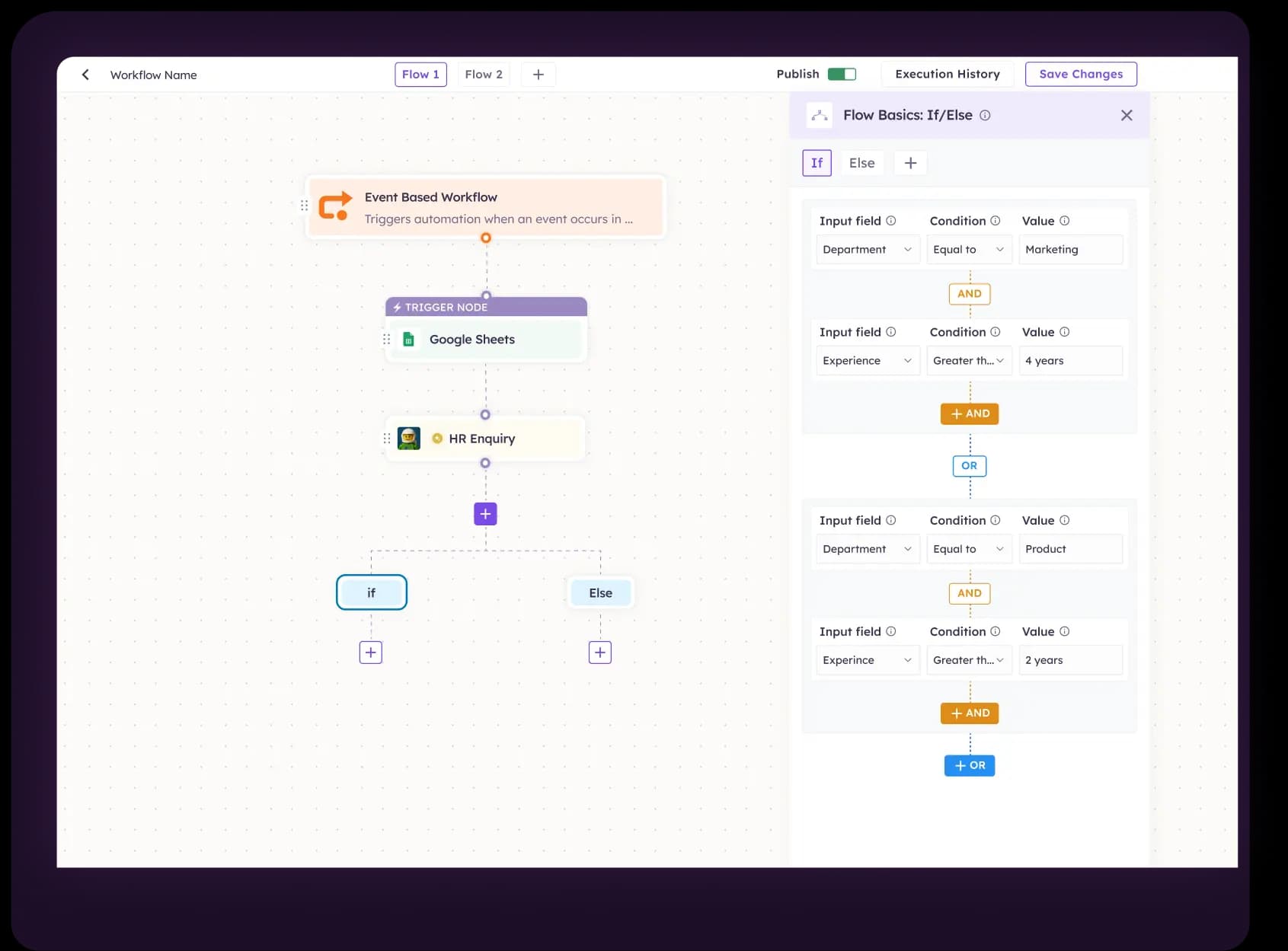
See the builder behind the workflow: an event, connected steps and explicit conditions on a single canvas.

DESIGN AROUND THE JOB

Automate a responsibility, not just a chain of actions.

Start with the responsibility and the systems it touches. Confirm the supported experience, operations and boundaries for your deployment.

Event-driven onboarding

Start the next responsibility when a source system confirms the customer’s state. Assign the onboarding work without assuming that an earlier meeting was a completed sale.

Example: a verified activation event creates an owned onboarding task.

Case progression

Move a case when the required information or decision arrives. Keep it in an explicit waiting state when the prerequisite is missing.

Example: a missing-document response resumes the appropriate intake step.

Scheduled follow-up

Trigger permitted follow-up against current case state and contact rules. Stop or change the sequence when the customer responds or the work is no longer eligible.

Example: remind the current owner about an unresolved task.

Cross-system coordination

Read the source of truth, perform a permitted operation in the destination and retain a reference linking the two.

Example: create a service task and verify its record and assigned owner.

VERIFIED WORK

A workflow needs state, not just arrows.

Make the expected action, record and authority visible. Attempted, completed and unresolved work should not be reported as the same outcome.

Work elementWhat to captureBoundary to preserve
TriggerA verified event or scheduled condition with a stable reference.Check the source, required fields and duplicate-event handling.
EligibilityThe current business state and the conditions for starting work.Do not infer a payment, approval or activation from a conversation.
Action & resultThe requested operation and verified destination record.Keep attempted, completed and unknown writes distinct.
Wait & recoverThe missing condition, next owner and resumption event.Define bounded retries and when a person must investigate.

BEFORE PRODUCTION

Design for late events and uncertain writes.

Use representative cases and deliberate failures to test the experience. Evaluate what the employee actually does as well as what the customer sees.

Repeated or out-of-order events

Test duplicate delivery, stale updates and events that arrive in an unexpected sequence. Define the source-of-truth rule and the reference used to avoid duplicate work.

Unavailable dependencies

Test permission errors, timeouts and service interruptions. Preserve the work state and agree when to retry, reconcile or stop rather than restarting the entire journey.

Long-running work

Name the owner of a waiting task and the event that permits it to continue. Define expiry and escalation conditions so pending work does not silently disappear.

Versioned changes

Review changes to routing, instructions, tools and permissions. Retest related paths and agree how affected work can be paused; rollback does not undo completed external writes.

A SCOPED PATH TO LAUNCH

Define the job. Connect it. Prove it works.

Agree the prerequisites and acceptance criteria with the business and technical owners. Expand responsibility only after reviewing outcomes and unresolved risks.

01

Scope

Choose the role, outcome, eligible inputs and exceptions.

Output: responsibility and authority map
02

Connect

Confirm supported channels, data access and system operations.

Output: reviewed configuration and access
03

Evaluate

Test routine work, ambiguity, failed actions and human handoffs.

Output: case-level evidence and open issues
04

Operate

Name the owner, review triggers and pause or recovery procedure.

Output: bounded release and operating plan

TWO WAYS TO START

Hire a role. Or design your own.

The capability supports the employee’s responsibility. It does not replace the need for a clear job, permitted tools and an accountable owner.

Explore pre-built employees

Choose a defined role and scope the capabilities and connections needed for your team.

Explore the workforce →

Build a custom workforce

Design the job around your process, then connect the relevant channels, systems and handoffs.

Build your workforce →

BUYER & IMPLEMENTATION QUESTIONS

Know what the experience needs to deliver.

What is AI workflow automation at UnleashX?

Workflow automation is how an AI employee connects events, approved actions and exception handoffs so a process finishes without a person shepherding each step. The measure is the recorded outcome, not the number of steps triggered.

How is workflow automation different from workforce orchestration?

Workflow automation connects triggers, conditions and actions for a process. Workforce orchestration assigns and coordinates responsibilities across employees and people. They work together: an event may start an employee’s job, while orchestration determines who owns the next responsibility.

Can workflows run without a conversation?

A supported system event or scheduled condition can be the starting point for a scoped workflow. Confirm available triggers and scheduling behavior for your deployment. The process still needs eligibility checks, permitted system operations and clear outcome evidence.

How do we avoid duplicate actions?

Define a stable request or event reference and the handling of repeated delivery. Inspect destination state before retrying uncertain writes. Use the retry and deduplication protections supported by each connected system.

Can a workflow wait for an external event?

Design explicit waiting states around verified prerequisites, such as a recorded decision or customer activation. Agree how supported events resume the process, who owns the wait and what happens if the event never arrives.

What happens if one step fails?

Preserve completed actions and the state of the affected step. Apply the defined recovery path and assign unresolved failures to an owner. Do not automatically repeat earlier actions that may already have succeeded or report the overall job complete.

Do we need custom integrations?

That depends on your systems, available APIs and required operations. Inventory the exact products, versions, reads, writes and network constraints. Confirm native connections or scoped integration work before assuming a workflow can be deployed unchanged.

Can we start with a pre-built employee?

Yes, start by choosing the responsibility from the workforce listing, then confirm the channel, system connections and operating boundaries needed for your use case. A pre-built role is a starting point for scoping; it does not eliminate integration, access or evaluation requirements.

What is needed before launch?

Agree the workflow outcome, permitted data and actions, exception owners and supported configuration. Test normal, ambiguous and failed cases in an approved environment. Review final records and release criteria before production; there is no universal implementation-time promise.

Aye Finance
Bajaj Capital
eMSME
Shyama Power
MedoPlus
Gullybaba
ICOFP
Sapio Analytics
Ostello
OnGrid
Black Kite Foundation
AAFM
Regus Automobiles
Karma Hyundai
Codestax
AksEdge
Tiger FinTech
Coneon
Xoxoday
Blu Parrot
Edgy Scribblers
NxG
V2C

CUSTOMER REVIEWS ON G2

From conversations to completed work.

4.9/ 5
  • End-to-end automation

    We’ve deployed UnleashX across a genuinely wide range of use cases, rather than relying on a single narrow bot.
    Nitin J.SVP, Head of EngineeringEnterprise (> 1,000 employees)
1 / 7

BRING ONE REAL WORKFLOW

Which process needs less chasing and clearer ownership?

Share the intended outcome, systems and exceptions. We’ll map the capability to a defined responsibility and a supportable operating model.