
Introduction
At 2 AM when a homeowner's furnace fails, ServiceTitan can't pick up the phone. During a summer AC breakdown spike with 200 simultaneous calls, it can't handle the overflow either. Voice AI fills that gap, an autonomous layer that answers calls 24/7, books jobs, and updates ServiceTitan records without human intervention.
But integration results vary wildly. Success depends on how the voice AI connects to ServiceTitan (native app, API, or middleware), how call flows are configured, and how accurately data fields are mapped. A properly configured setup creates customer records, logs call notes, and books appointments automatically. A misconfigured one generates duplicate records, misroutes calls, and traps customers in dead-end AI loops.
This guide covers prerequisites, a step-by-step integration process, the variables that determine success, and the mistakes that cause most setups to fail.
Key Takeaways
- Voice AI integrates with ServiceTitan via native marketplace apps, direct API, or middleware like Zapier or Make
- A full integration lets AI answer calls, create records, log notes, and book jobs inside ServiceTitan with no manual entry
- Results depend on call routing setup, intent recognition accuracy, and ServiceTitan field mapping precision
- Best fit for businesses fielding 50+ inbound calls weekly or running lean CSR teams during peak seasons
- Most failures stem from skipped API permission configuration or no human escalation path
How to Integrate Voice AI with ServiceTitan
Step 1: Generate ServiceTitan API Credentials and Confirm Access
Before any voice AI can write data into ServiceTitan, you need proper API access and credentials.
Generate API Credentials:
- Log into the ServiceTitan Developer Portal
- Create an app key with required scopes: Customer, Booking, Job, and Call records
- Note your Tenant ID required for OAuth 2.0 authentication
- Have a Tenant Admin approve the app to generate your Client ID and Client Secret
Verify Subscription Tier:
ServiceTitan restricts API and third-party integration access to customers on "The Works" package or specific legacy plans. Attempting to connect without this entitlement will hit hard blockers. Verify your subscription tier with your ServiceTitan account representative before purchasing a voice AI platform.
Check Rate Limits:
ServiceTitan enforces strict rate limits: 60 API calls per second per application per tenant for regular APIs, and 5 calls per minute for reporting APIs. A busy HVAC company during summer may generate hundreds of API calls daily. Confirm your account's rate limits can accommodate expected call volume exceeding limits triggers HTTP 429 errors that break your integration.
Step 2: Set Up and Configure Your Voice AI Platform
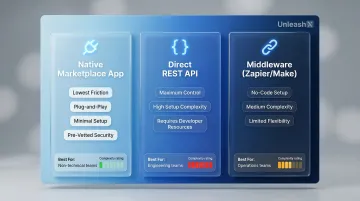
Choose Your Integration Method:
| Integration Path | Best For | Setup Complexity |
|---|---|---|
| Native Marketplace App | Lowest friction, plug-and-play | Minimal pre-vetted for security |
| Direct REST API | Maximum control and customization | High requires developer resources |
| Middleware (Zapier/Make) | Non-technical teams, no-code setup | Medium visual builder, limited flexibility |
Configure Call Routing:
Forward your ServiceTitan-linked business phone number to the voice AI's dedicated number. This routes every inbound call through the AI before it reaches a human CSR. Most VoIP systems (RingCentral, Nextiva, Dialpad) support external forwarding natively. Verify your phone system supports this before proceeding.
Define Conversation Flows:
Set up intents for core scenarios your business handles:
- New booking requests
- Reschedule appointments
- Pricing inquiries
- Emergency dispatch
- After-hours calls
Configure the trigger for human escalation when the AI decides a live CSR should take over. Platforms like UnleashX offer pre-built home service conversation templates that reduce configuration time to under 45 minutes.
With your call flows defined, the final setup task is connecting your voice AI to ServiceTitan's API.
Authenticate API Connection:
If using the direct API path, authenticate using OAuth 2.0 with your app key and Tenant ID. ServiceTitan access tokens expire in 15 minutes, so implement token caching and refresh logic. Confirm connectivity by making a test GET request to the Customer endpoint.
Step 3: Map Voice AI Outputs to ServiceTitan Data Fields
Precise field mapping is what separates a reliable integration from one that floods ServiceTitan with corrupt or duplicate records.
Define What the AI Writes:
Your voice AI must:
- Create a new Customer record if one doesn't exist (or match to existing)
- Log call summary notes with key details
- Create a Booking with correct job type and time window
Once you've confirmed what gets written, map each piece of collected data to its exact ServiceTitan field:
Map Data Fields Precisely:
- Caller name → Customer Name
- Address → Service Location Address
- Phone → Customer Phone
- Issue type → Job Type
- Preferred appointment window → Booking Start/End Time
The most common integration failure is the UniqueConstra error, caused by missing or duplicate Source ID (External ID) fields during Booking creation. Every booking payload must include a unique identifier. Generate secure, unique idempotency keys (such as UUIDv4) for every request to prevent duplicate records.
Choose Sync Timing:
Decide whether syncing happens in real time during the call or in a post-call batch. Real-time sync is preferable for booking confirmations but requires lower API latency and stable connection. UnleashX, for instance, operates at sub-700ms latency fast enough to confirm bookings before the caller hangs up.
Step 4: Test All Scenarios and Go Live
Run Live Test Calls:
Test every intent scenario your AI handles:
- New customer booking
- Existing customer reschedule
- After-hours inquiry
- Emergency dispatch
Verify that correct records appear in ServiceTitan with accurate data populated in the right fields.
Test the Escalation Path Explicitly:
Confirm that when the AI transfers a call to a human CSR, the CSR receives context caller name, issue, what was already discussed rather than starting from scratch. An escalation without context forces customers to repeat themselves, destroying the experience.
Monitor the First 48–72 Hours:
Watch both your voice AI dashboard and ServiceTitan closely to catch data mapping errors or call routing failures early. Audit a sample of AI-generated records to catch systematic mapping errors before they scale.
What You Need Before Integrating Voice AI with ServiceTitan
Your ServiceTitan account must be on a plan that supports API access, and you need admin-level permissions to generate app keys without this, no external voice AI can write data back into your system.
Equipment and System Requirements
VoIP Call Forwarding
Your business phone system must support call forwarding to an external number. Most VoIP systems handle this natively:
- RingCentral: Supports automatic call forwarding to external numbers, including simultaneous or sequential routing
- Nextiva: Offers "Call Forward Selective" to route calls based on time-of-day or specific conditions
- Dialpad: Allows admins to automatically forward incoming calls to up to five external numbers
- ServiceTitan Phones Pro: Native telephony with advanced routing workflows and IVR menus
Analog landlines and some hosted PBX setups may need extra configuration. Before signing up with any vendor, confirm whether they require a dedicated SIP trunk or accept a standard forwarded number, this affects both call quality and latency.
Inputs, Skill, and Compliance Readiness
Prepare your intent library before go-live, not after. Map out your most common inbound call reasons booking types, service areas, emergency triggers so the AI is trained on your workflows from day one.
Generic voice AI doesn't understand trades-specific language out of the box. Phrases like "my AC is short-cycling," "I need a camera inspection," or "my breaker keeps tripping" need to be built into the intent library before the system touches a live call.
Call recording consent is a legal requirement in eleven U.S. states, including California under CIPA Penal Code § 632. If you operate in any of these states, your voice AI vendor must support compliant disclosure playback at the start of each call. For example: "This call is being recorded and handled by an automated assistant." Failure to disclose creates significant fines and civil liability.
When Voice AI + ServiceTitan Integration Makes Sense
Voice AI earns its place in specific operational contexts. Deploy it in the wrong scenario and you frustrate customers without recovering the setup cost.
Ideal Use Cases:
- Businesses receiving more inbound calls than their CSR team can answer during peak hours
- After-hours call handling where every missed call is a lost job (emergency calls average ₹1.5 lakh (≈ $1,850)per job)
- Re-engagement of old leads in ServiceTitan who never converted
- High-volume appointment booking for recurring service plans
- Peak-season overflow (e.g., HVAC companies during summer, plumbers during freeze events)
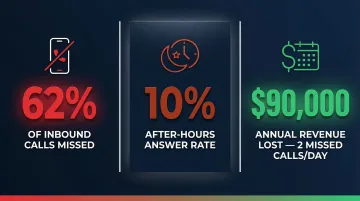
These use cases matter because the volume problem is real. Contractors miss 62% of inbound calls on average, and after-hours answer rates drop to just 10%. Missing two calls per day costs roughly ₹74.7 lakh (≈ $90,000)in annual revenue. Voice AI targeting after-hours and peak-season overflow captures high-value emergency jobs that would otherwise go to a competitor who picked up the phone.
That said, there are situations where this integration creates more problems than it solves.
Situations Where It Becomes Inefficient or Risky:
- Businesses with highly complex diagnostic conversations requiring technical expertise before booking
- Teams with fewer than 20–30 inbound calls per week (ROI may not justify setup investment)
- Companies with poorly maintained ServiceTitan data, the AI will inherit and amplify those problems
Key Parameters That Determine Integration Success
Even a technically correct integration can underperform if the following variables aren't actively managed. These are the levers that separate a voice AI that books jobs from one that frustrates callers.
Call Routing Latency
If there's a noticeable delay between when a caller hears the AI pick up and when it responds, callers hang up. The ITU-T G.114 recommendation caps one-way transmission time at 400ms (800ms round-trip), and UX research puts 1 second as the absolute limit before users lose their train of thought.
High latency also causes cross-talk caller and AI speaking simultaneously which harms call quality and lowers booking completion rates. Aim for sub-700ms response latency as your baseline for acceptable performance.
Intent Recognition Accuracy
Voice AI trained on generic call scripts will misroute trades-specific calls. The system must recognize phrases like "my AC is short-cycling," "I need a camera inspection," or "my breaker keeps tripping" to route and log correctly, generic NLP models simply won't cut it.
Poor intent accuracy pushes more calls to human CSRs, eating into the automation benefit. Before going live:
- Document your 10–15 most common caller phrases
- Verify each is covered in your AI's intent library
- Prioritize platforms with pre-built trades intent libraries, which cut configuration time considerably
ServiceTitan Field Mapping Precision
Every field the AI populates incorrectly like wrong job type, missing zip code, mislinked customer record and creates manual correction work and erodes the data quality that drives ServiceTitan's dispatching and reporting.
Audit a sample of AI-generated records weekly during the first month to catch systematic mapping errors before they scale. The most common failure point is the UniqueConstra error, caused by missing or duplicate Source ID fields.
Escalation Logic and Handoff Design
The escalation trigger when the AI hands off to a human and is the most business-critical configuration decision in the entire setup. Too loose, and the AI escalates everything. Too tight, and callers get stuck in loops.
Define explicit escalation triggers:
- Caller says "let me speak to someone"
- Call type is emergency
- Caller has expressed frustration twice
- AI confidence score drops below threshold
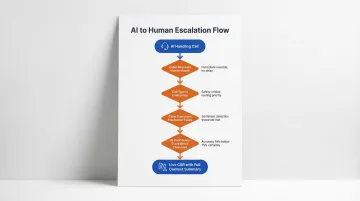
Ensure the receiving CSR sees a real-time call summary from the AI to avoid repeating questions. When escalation logic is properly configured, documented deployments report booking rates between 67% and 85%.
Common Mistakes When Integrating Voice AI with ServiceTitan
Most integration failures trace back to a handful of predictable missteps. Here are the three that derail teams most often and how to avoid them.
Skipping API Scope Configuration
Many teams generate an API key but fail to request the correct permission scopes especially Booking and Job write permissions. This causes the integration to silently fail: the AI answers calls but nothing is written to ServiceTitan. Verify scope coverage against your ServiceTitan API documentation before running a single test call.
Deploying Without Intent Training on Trades-Specific Language
Generic voice AI without customization doesn't understand home service terminology, so booking rates will be low and misroutes will be high. Before launch:
- Load your most common call scenarios into the AI's training set
- Map trades-specific terms (e.g., "tune-up," "dispatch," "no-heat call") to correct intents
- Or choose a platform with pre-built trades intent libraries
Skipping this step is the single fastest way to erode caller trust in the first week.
No Defined Human Escalation Path
Businesses that configure voice AI as a wall between callers and humans with no clear escalation route experience customer churn. Always include a clear path to a live CSR, and ensure the handoff carries full context from the AI session. The most effective deployments treat voice AI as a CSR force multiplier: it handles routine intake so human agents can focus on complex calls where judgment actually matters.
Frequently Asked Questions
How do AI voice agents handle Hindi and regional languages for Indian customers?
Modern voice AI platforms support natural conversations in Hindi, Tamil, Telugu, Kannada, Marathi, Bengali, and code-mixed Hinglish. UnleashX voice agents detect caller language automatically, switch mid-call where needed, and integrate with WhatsApp for follow-ups, which matches how Indian buyers in BFSI, real estate, and D2C actually engage.
Which Indian companies are deploying AI voice agents in production?
Indian BFSI majors (HDFC, ICICI, SBI, Axis), real estate firms, lending NBFCs, and D2C brands are running voice AI in production for sales calls, KYC follow-ups, and customer support. NASSCOM has tracked rapid adoption across IT services and BPO firms (TCS, Infosys, Wipro, HCLTech) building voice AI practices for Indian and pan-India enterprise clients.
What Indian regulations should I consider before deploying voice AI?
DPDP 2023 governs personal data handling in voice interactions, including consent capture and audit trails. RBI guidelines on outsourcing apply to BFSI deployments, IRDAI rules cover insurance workflows, and TRAI's commercial communication rules govern outbound calling. Production-grade voice AI platforms maintain call recordings, language logs, and consent receipts to meet these requirements.
Can voice AI integrate directly with ServiceTitan without middleware?
Yes, direct integration via the ServiceTitan API is possible for platforms that support OAuth 2.0 authentication and REST API calls. However, middleware tools like Zapier or Make are valid lower-code alternatives for teams without developer resources. Both paths require "The Works" subscription tier for API access.
How long does it take to set up voice AI with ServiceTitan?
Setup time ranges from under an hour (for platforms with pre-built ServiceTitan connectors and templates) to several days (for custom API builds). The majority of time is spent on intent configuration and field mapping rather than the technical connection itself. Platforms offering visual builders and pre-built templates cut go-live time to under a day.
What happens to ServiceTitan data when a voice AI handles a call?
A properly configured integration creates or matches a Customer record, logs call notes, and creates a Booking without manual input. Run post-call audits in the first few weeks to catch field mapping errors early; real-time sync is preferable for booking confirmations but requires stable API connectivity.