
Introduction
AI voice chatbots have moved from novelty to operational necessity. Businesses across sales, support, and operations are now embedding them into their existing tech stacks CRM platforms, helpdesk systems, and communication channels. The shift is driven by clear economics: Gartner projects that conversational AI will reduce customer service labor costs by $80 billion (approximately ₹664,000 crore) by 2026, with 85% of customer service leaders actively piloting customer-facing conversational GenAI in 2025.
The numbers tell a different story once implementation begins. 70–85% of enterprise AI implementations fail to achieve their intended outcomes poor data readiness, unclear business value, and system compatibility issues drive most of those failures.
The gap between a working demo and a production-ready voice chatbot handling real customer conversations is wider than most teams expect.
This guide walks through the prerequisites, a step-by-step integration process, and the specific mistakes that cause most deployments to stall or fail before they deliver value.
Key Takeaways
- Start with a system audit skipping it is the #1 reason integrations fail
- Integration order: system audit → platform selection → API/CRM setup → voice config → test and deploy
- Latency, NLU accuracy, escalation rules, and CRM sync determine integration success or failure
- Generic training data and undefined handoff rules cause most post-launch problems
- Insurance, e-commerce, and banking see the strongest ROI when chatbots connect to CRM and workflow automation
How to Integrate AI Voice Chatbots Into Your Existing Systems
Step 1: Audit Your Existing Systems and Define the Use Case
Start by identifying which specific workflows the voice chatbot will own. Will it handle inbound support queries, qualify sales leads, book appointments, recover abandoned carts, or screen HR candidates? Map every system it must connect to CRM, ticketing platform, payment gateway, calendar, or order management.
Assess whether your current CRM and communication stack expose documented REST APIs or webhooks the chatbot can call. Undocumented or deprecated APIs are the leading cause of stalled integrations. If your legacy systems lack modern API support, plan for a middleware layer or webhook bridge early.
Document current call and conversation volumes, peak traffic hours, and the languages your customer base communicates in. This scopes your integration realistically before any platform is selected. For example, if you handle 10,000 calls monthly with spikes during business hours and serve customers in English, Hindi, and Tamil, your platform must support those languages and handle concurrent call volumes without degradation.
Step 2: Select the Right AI Voice Chatbot Platform
Evaluate platforms against three criteria that should drive every platform decision: native integrations with your existing stack, voice response latency and quality benchmarks, and time-to-deployment.
Integration depth matters. Platforms like UnleashX offer pre-built AI employee templates that connect to 200+ tools including Salesforce, HubSpot, Zendesk, Slack, WhatsApp, and Calendly and can go live in approximately 45 minutes, significantly reducing integration overhead compared to custom-built solutions.
Latency is critical. Human conversation operates on a 200–300ms response window. For voice AI, time-to-first-audio under 600ms feels natural; delays exceeding 800ms break conversational flow, and anything over 1,500ms triggers user frustration and call abandonment. Contractually enforce sub-700ms end-to-end latency SLAs with vendors.
Language coverage determines reach. For businesses operating in India, verify support for regional languages such as Hindi, Tamil, Bengali, and Telugu. Also confirm the platform handles code-switching when customers naturally mix languages mid-conversation which is common across multilingual markets.
Verify that the platform's compliance certifications (GDPR, IRDAI, SOC 2) match your industry's regulatory requirements before committing. This is easier to confirm upfront than to remediate after deployment.
Step 3: Connect APIs and Integrate Core Business Systems
Establish bidirectional API connections between the voice chatbot and your CRM so call outcomes lead status updates, conversation summaries, follow-up task creation are automatically written back without manual data entry.
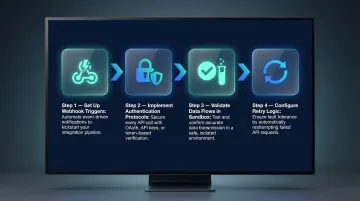
Key integration steps:
- Set up webhook triggers for event-driven actions: a qualified lead conversation should fire a CRM record update; a completed cart recovery call should trigger a payment link or update the order management system
- Implement proper authentication protocols (OAuth 2.0, API keys with scoped permissions) following IETF RFC 6749 standards
- Validate all data flows in a sandbox environment before connecting to production systems
- Configure retry logic using exponential backoff with jitter and dead-letter queues for failed webhook attempts
Real-time CRM integration can reduce Average Handle Time (AHT) by 28% by eliminating the need for agents to re-ask questions customers already answered during the bot interaction.
Step 4: Configure the Voice Experience and Conversation Flow
Define the bot's persona, tone, and the exact conditions that trigger human escalation. For example, detected customer frustration, three consecutive unresolved intents, or an explicit request for a human agent should all trigger handoff and ensure context is fully preserved when the handoff occurs.
Train the NLU model on real conversation data drawn from your support logs, historical call transcripts, and domain-specific FAQs rather than generic datasets. Fine-tuning a model with approximately 1,000 labeled domain-specific utterances easily surpasses the performance of generic pre-trained models. The specificity of training data is the single biggest predictor of intent recognition accuracy.
Build fallback handling into every conversation path. Specify what the bot says when it cannot understand input, and design recovery steps that keep the conversation on track rather than terminating the call. A well-designed fallback response names what went wrong, offers a clearer prompt, and gives the caller a concrete next step rather than a dead end.
Step 5: Test, Go Live in Phases, and Monitor Performance
Run three types of pre-launch testing:
- Functional testing: Does each intent resolve correctly?
- Integration testing: Are CRM records being created and updated?
- Load testing: Can the system handle your peak concurrent call volume?
Deploy in a phased rollout launch on one channel or one use case before scaling to full deployment. Organizations that take a phased, staged migration path see a 17% increase in customer satisfaction and a 20% improvement in agent efficiency compared to "big bang" legacy cutovers.
Define post-live monitoring KPIs before the launch date:
- Containment rate (percentage of conversations resolved without human escalation)
- Average handle time
- Escalation rate
- CRM sync accuracy
- Customer satisfaction score
Review these weekly for the first 60 days and use them to drive iteration. Early monitoring reveals patterns such as specific intents that consistently fail or times of day when escalation rates spike that inform optimization.
What You Need Before Starting Integration
System and API Requirements
Confirm that every system the chatbot must connect to CRM, helpdesk, communication channels exposes documented, active APIs. Identify any legacy or undocumented systems early and plan a middleware or webhook layer as a workaround.
Common integration targets include:
- CRM platforms: Salesforce, HubSpot, Zoho
- Helpdesk tools: Zendesk, Freshdesk, Intercom
- Communication channels: WhatsApp, telephony APIs, Slack
- Calendaring systems: Calendly, Google Calendar
- Payment gateways: Stripe, PayPal, Razorpay
Data and Training Readiness
Prepare a domain-specific training corpus before touching any platform configuration. Pull labeled intent examples from real customer conversations, compile a curated FAQ database, and standardize formatting across all entries. Raw, uncleaned data degrades model accuracy remove duplicates and ensure examples reflect your current business processes and product offerings.
Compliance and Access Approvals
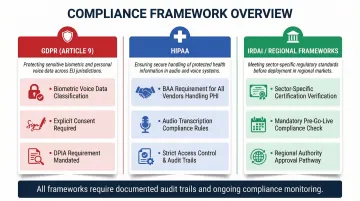
Obtain internal IT security sign-off on data access scopes and confirm data residency requirements match the AI vendor's infrastructure before procurement. For regulated industries, specific obligations apply:
- GDPR (Article 9): Voice data used for identification is classified as special category biometric data, requiring explicit consent and mandatory Data Protection Impact Assessments (DPIAs)
- DPDP Act 2023: Any vendor transcribing or storing audio containing protected health information must sign a Business Associate Agreement (BAA)
- IRDAI / Regional Frameworks: Insurance and banking deployments require verifying the vendor's compliance certifications against sector-specific obligations before go-live
Key Parameters That Affect Integration Success
Integration outcomes vary significantly based on four controllable variables. Organizations that optimize these before launch consistently outperform those that treat them as post-deployment concerns.
Response Latency
Voice conversations are synchronous and time-sensitive. Any response delay longer than 800ms breaks the conversational feel, and delays over 1,500ms trigger neurological stress responses causing users to talk over the agent, repeat themselves, or drop the call. J.D. Power reports 68% of customers abandon calls when automated systems feel slow.
Verify that your chosen platform meets sub-800ms time-to-first-audio thresholds in your target geography under real traffic conditions not just vendor-quoted lab specs. Sub-700ms is the benchmark for natural conversational flow at peak load.
NLU Model Accuracy and Training Data Quality
An undertrained model misclassifies intents, generates incorrect responses, and pushes conversations to human agents that the bot should have handled undermining both cost and customer experience goals.
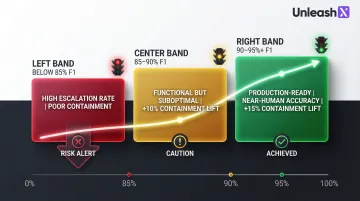
A 10-point improvement in NLU F1 scores (for example, from 85% to 95%) yields a 10–15% lift in call containment. Target an F1 score above 90% for production-ready workflows; scores above 95% represent near-human understanding for structured tasks.
Escalation Protocol Design
A bot that escalates too aggressively negates cost-reduction benefits. One that refuses to escalate damages customer satisfaction and creates compliance risk in regulated industries.
Set escalation thresholds using measurable signals:
- User explicitly requests a human ("talk to agent," "I want a person")
- Consecutive unresolved intents or confidence scores drop below 50–70%
- Sentiment scoring signals frustration before the user disengages
- Full conversation history, intent classification, and customer data passes to the agent so the customer never has to repeat themselves
CRM Sync Reliability
If conversation outcomes do not reliably write back to the CRM, sales and support teams lose context and must re-ask questions customers already answered eroding trust and creating duplicate work at scale.
Bidirectional sync is the target standard: the bot reads from and writes to the CRM in real time. One-directional or delayed sync creates data gaps that compound over high call volumes. Mister Spex saved 30 seconds per call by integrating voice AI with real-time CRM updates, eliminating redundant data entry entirely.
Common Mistakes to Avoid When Integrating AI Voice Chatbots
Skipping the pre-integration audit. API incompatibilities and missing system connections discovered mid-rollout are the costliest delays in any integration project. Run a thorough audit before selecting a platform not after.
Training on generic data instead of real conversations. NLU models trained on vendor sample FAQs handle hypothetical scenarios well but fail on actual customer queries from day one. Use your own conversation logs.
No defined escalation rules before launch. A fully autonomous bot without handoff conditions is a customer experience and compliance liability especially in insurance, banking, and healthcare, where regulatory exposure is high. Escalation triggers must be defined before go-live.
Going live without baseline monitoring KPIs. Without pre-set benchmarks for containment rate, escalation frequency, and CRM sync accuracy, teams can't identify what's underperforming or track improvement over time.
Conclusion
Integrating an AI voice chatbot into existing systems delivers measurable results reduced handle time, 24/7 coverage, and automated CRM updates when the pre-work is solid. A thorough systems audit, clean training data, validated API connections, and clear escalation rules before any customer interaction goes live are the foundation of successful deployment.
Most integration failures trace back to skipped audits, generic training data, or undefined handoff protocols not the technology itself. Each of these gaps is preventable when teams follow a structured pre-deployment checklist.
With that groundwork in place, start with a focused single-use-case deployment, track KPIs closely for the first 60 days, and expand only from a proven baseline. Teams that follow this sequence consistently see faster time-to-value and fewer costly rollbacks.
Frequently Asked Questions
How do AI voice agents handle Hindi and regional languages for Indian customers?
Modern voice AI platforms support natural conversations in Hindi, Tamil, Telugu, Kannada, Marathi, Bengali, and code-mixed Hinglish. UnleashX voice agents detect caller language automatically, switch mid-call where needed, and integrate with WhatsApp for follow-ups, which matches how Indian buyers in BFSI, real estate, and D2C actually engage.
Can conversational AI operate across voice, chat, and messaging platforms?
Yes. Modern conversational AI platforms are built for omnichannel deployment: the same AI model handles voice calls, live chat, WhatsApp, and email. When configured correctly, context carries across channels so customers never have to repeat themselves.
Which Indian companies are deploying AI voice agents in production?
Indian BFSI majors (HDFC, ICICI, SBI, Axis), real estate firms, lending NBFCs, and D2C brands are running voice AI in production for sales calls, KYC follow-ups, and customer support. NASSCOM has tracked rapid adoption across IT services and BPO firms (TCS, Infosys, Wipro, HCLTech) building voice AI practices for Indian and pan-India enterprise clients.
What Indian regulations should I consider before deploying voice AI?
DPDP 2023 governs personal data handling in voice interactions, including consent capture and audit trails. RBI guidelines on outsourcing apply to BFSI deployments, IRDAI rules cover insurance workflows, and TRAI's commercial communication rules govern outbound calling. Production-grade voice AI platforms maintain call recordings, language logs, and consent receipts to meet these requirements.
What systems can an AI voice chatbot integrate with?
AI voice chatbots integrate with CRM platforms (Salesforce, HubSpot, Zoho), helpdesk tools (Zendesk, Freshdesk), communication channels (WhatsApp, telephony APIs, Slack), payment gateways, calendaring systems (Calendly, Google Calendar), and order management platforms via REST APIs or webhooks.
How do I ensure compliance when integrating an AI voice chatbot?
Start by confirming the vendor's certifications match your industry requirements (GDPR, IRDAI, DPDP Act 2023), then verify data residency and encryption standards. Get IT security and legal sign-off before connecting to production systems. For regulated sectors, add automated pre-call disclosures and strict data retention policies.