
Introduction
MSPs face mounting pressure to deliver more with less. 42% of technology firms worry about ongoing talent shortages, while 91% cite profitability as a top priority. Client touchpoints multiply support triage, scheduling, lead follow-up but teams stay lean. Voice AI can absorb that load, yet 88% to 95% of enterprise AI pilots fail to reach production, most often because of poor integration planning rather than technology limitations.
This guide walks through practical best practices for MSPs integrating Voice AI into existing platforms: what to connect, how to deploy, what to avoid, and how to sustain performance long-term.
TLDR:
- Map workflows before selecting tools; tightly scoped agents consistently outperform broad, vague deployments
- Design conversation flows from real call data, not assumptions
- Integrate CRM and PSA systems from day one to avoid data silos
- Set explicit escalation triggers before go-live to prevent customer frustration
- Run a weekly tuning cadence, Voice AI performance drops without active maintenance
What Voice AI Integration Actually Means for MSP Platforms
Voice AI integration for MSPs isn't about adding a chatbot or replacing your IVR. It means embedding AI-driven voice into existing workflows ticketing, scheduling, client onboarding, after-hours support so the voice layer reads context, takes action, and updates systems autonomously. That distinction between isolated voice tools and fully integrated AI is where real MSP value gets created.
From Isolated Agents to Orchestrated Workflows
Traditional voice bots answer calls. Integrated Voice AI resolves issues, routes intelligently, and syncs data across your stack in real time. Gartner predicts 40% of enterprise applications will feature integrated, task-specific AI agents by 2026, up from less than 5% in 2025. This marks a clear shift from tools that support individual productivity to platforms that enable autonomous collaboration and dynamic workflow orchestration.
Why This Matters for MSPs
61% of SMBs work with MSPs because they lack internal technical expertise, and 56% need help managing hybrid and remote workforces. That demand lands squarely on MSP teams already stretched thin.
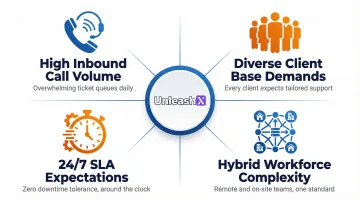
Most MSPs face a combination of pressures that make voice automation a smart investment:
- High inbound call volume with limited staff to handle it
- Diverse client bases requiring consistent, context-aware responses
- 24/7 SLA expectations that human teams can't sustain alone
- Hybrid workforce complexity adding coordination overhead
The investment pays off only when voice AI connects to the systems that run your operation not when it sits as a standalone tool.
Best Practices for Integrating Voice AI with MSP Platforms
Define the Workflow Scope Before Selecting a Tool
Map exactly which workflows Voice AI will own before choosing a platform. That means deciding upfront: Level 1 triage, appointment booking, lead follow-up, or after-hours coverage.
Vague deployments lead to scope creep and underperformance. Each agent should have a tightly scoped function with clear success criteria.
Examples of well-scoped workflows:
- After-hours call handling for Tier 1 issues only
- Appointment scheduling for on-site technician visits
- Lead qualification, demo booking, and follow-up sequencing
- Password reset and basic account troubleshooting
Use Real Call Data to Design Conversation Flows
Analyze existing call transcripts, common support queries, and ticket categories before building conversation logic. Analyzing historical customer conversations is a clear best practice for designing data-driven flows.
Voice flows built from real data consistently outperform those designed on assumptions intent recognition is sharper, and callers drop off less often because the flow matches how they actually speak.
Run a Controlled Pilot on One Workflow or One Client
Start with a single use case after-hours call handling for one client works well to surface integration gaps, edge cases, and calibration needs before scaling.
Phased deployment de-risks full rollout. You'll surface real-world friction points without exposing your entire client base to an untested system.
Build System Integrations from Day One
Voice AI without live CRM or PSA data is blind. Configure CRM sync, ticket creation, and calendar access before the agent goes live not as an afterthought.
A disconnected voice agent creates data silos and inconsistent client experiences. AI-assisted service desks integrated with ticketing systems reduce Tier-1 resolution time from 25–45 minutes down to 2–4 minutes.
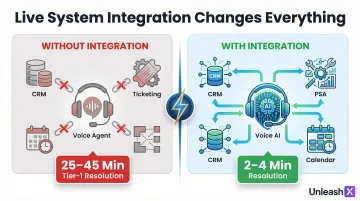
UnleashX's AI employees are built with cross-system CRM sync so data updates happen autonomously no manual entry required after a call closes.
Define Human Escalation Rules and Triggers Explicitly
Every Voice AI deployment needs clear handoff conditions:
- When does the AI transfer to a human agent?
- What context gets passed along?
- How is the handoff logged?
Undefined escalation paths are among the most common sources of customer frustration in MSP voice AI deployments. Conversational gaps of 700 milliseconds or more generate negative inferences or frustration from callers which means a missed handoff often feels worse than no AI at all.
Establish a Weekly Review and Tuning Cadence Post-Launch
Voice AI performance degrades without active maintenance. Schedule regular reviews of:
- Call transcripts
- Failed intents
- Drop-off points and where callers abandon
- Unresolved queries
Use these reviews to refine prompts, update knowledge sources, and improve routing logic. For client-facing agents, biweekly review is the minimum. The NIST AI Risk Management Framework mandates organizations establish feedback processes to monitor measurable performance improvements or declines.
Key Integration Points: What Voice AI Needs to Connect To
CRM Integration
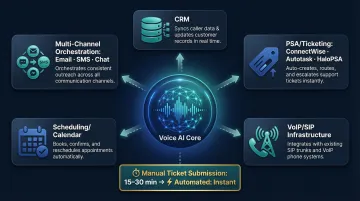
Voice AI must read from and write to the CRM in real time pulling customer history before a call begins and logging outcomes automatically after.
Without this, agents are forced to re-explain their situation, and MSPs lose data continuity. Platforms like UnleashX address this with cross-system CRM sync, so call outcomes update automatically across connected tools without a human touching the record.
PSA and Ticketing Systems
Connect Voice AI to PSA tools (ConnectWise, Autotask, HaloPSA) so it can create, update, and route tickets during or after a call.
This eliminates the gap between a customer call and a technician's queue. Without automated integration, end users can take 15 to 30 minutes just to identify the correct category and submit a ticket manually.
Telephony and VoIP Infrastructure
Voice AI must integrate cleanly with existing SIP trunks, hosted PBX systems, or UCaaS platforms not replace them.
79% of retail voice service connections were interconnected VoIP lines by June 2024. Voice AI platforms support SIP-based integration using protocols like SIPREC, which means MSPs can add AI capabilities without rebuilding their phone infrastructure.
Scheduling and Calendar Tools
MSPs commonly use Voice AI for appointment booking, technician dispatch, and client meeting coordination.
The AI must have read/write access to calendar systems to confirm, reschedule, or cancel in real time without human intervention.
Multi-Channel Workflow Orchestration
The most effective integrations go beyond voice alone they connect voice with email follow-up, chat, and SMS within a unified workflow.
MSPs who deploy voice within a multi-channel workflow report up to 46% faster client response times. Platforms that orchestrate this natively rather than connecting isolated bots handle hand-offs between channels without breaking context or requiring manual re-routing.
Top Use Cases for Voice AI in MSP Environments
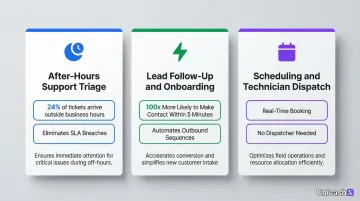
After-Hours Support Triage
Voice AI handles incoming support calls outside business hours end-to-end. It collects issue details, assesses urgency, creates a ticket, and either escalates immediately or schedules a callback no human intervention required.
24% of IT help desk tickets arrive outside standard business hours or on weekends. Overnight tickets often remain unaddressed for extended periods, leading directly to SLA breaches and client churn.
Lead Follow-Up and Client Onboarding Calls
MSPs can use Voice AI to automate outbound follow-up calls for new prospects, onboarding check-ins, and renewal reminders.
Companies that respond to leads within 5 minutes are 100 times more likely to make contact and 21 times more likely to qualify the lead than those that wait 30 minutes. Most MSPs can't staff for that speed manually, Voice AI closes the gap automatically.
Scheduling and Technician Dispatch
Voice AI can handle scheduling calls for on-site visits, maintenance windows, and quarterly reviews confirming and updating appointments in real time through direct calendar integrations. No dispatcher needed.
Common scheduling tasks it handles:
- Books on-site visits and maintenance windows based on technician availability
- Sends confirmation and reminder calls to clients automatically
- Reschedules appointments through natural conversation when conflicts arise
- Logs all updates back to the PSA or calendar platform in real time
Together, these three use cases cover the highest-friction points in MSP operations after-hours coverage, lead speed, and scheduling overhead, each addressable without adding headcount.
Common Mistakes MSPs Make When Integrating Voice AI
Three mistakes show up repeatedly across MSP deployments and each one is avoidable.
Deploying Without a Defined Knowledge Base
Voice AI cannot perform well without access to a structured knowledge base, ticketing history, or FAQ documentation.
MSPs that launch voice agents without relevant context get generic, unhelpful responses clients stop using the system or escalate to human agents instead.
Treating Voice AI as a One-Time Setup
Voice AI requires ongoing tuning, updating intent logic, adjusting prompts, adding edge cases, and monitoring performance.
MSPs that treat it as "set and forget" typically see measurable performance decay within the first 30–60 days of launch.
Ignoring Latency and Call Quality Requirements
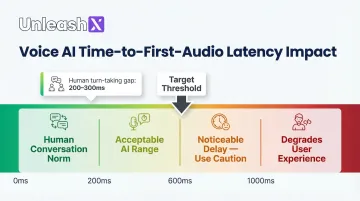
High latency in Voice AI responses creates awkward pauses that make the interaction feel broken.
Human conversational turn-taking gaps typically range between 200 and 300 milliseconds. For Voice AI, Time-to-First-Audio under 600ms feels natural; above 1000ms reliably degrades user experience. MSPs must evaluate response latency benchmarks as part of platform selection not after deployment.
Quick reference : what to audit before go-live:
- Knowledge base coverage: ticketing history, FAQs, and common client workflows loaded
- Retraining schedule: intent logic reviewed at least monthly post-launch
- Latency threshold confirmed: Time-to-First-Audio under 600ms during platform evaluation
Security and Compliance Considerations
Data Encryption and Access Controls Are Non-Negotiable
Voice AI platforms handling client calls must use TLS encryption for API communications, SRTP for voice streams, and maintain full audit logs of all interactions.
For MSPs serving regulated industries (healthcare, finance, insurance), compliance with frameworks like DPDP Act 2023, GDPR, and IRDAI must be verified before deployment.
Build Compliance Monitoring Into the Integration
Select Voice AI platforms with built-in compliance monitoring. Key capabilities to verify before deployment:
- Call recording retention policies aligned to jurisdiction-specific requirements
- Data residency options for regulated data (particularly relevant for GDPR and IRDAI)
- Automated flagging of policy violations before they escalate
- Business Associate Agreement (BAA) support for DPDP Act 2023, the HHS Office for Civil Rights requires covered entities to execute a BAA with any third party that handles Protected Health Information
- Records of processing activities for GDPR compliance, as mandated by Article 30
Frequently Asked Questions
How do AI voice agents handle Hindi and regional languages for Indian customers?
Modern voice AI platforms support natural conversations in Hindi, Tamil, Telugu, Kannada, Marathi, Bengali, and code-mixed Hinglish. UnleashX voice agents detect caller language automatically, switch mid-call where needed, and integrate with WhatsApp for follow-ups, which matches how Indian buyers in BFSI, real estate, and D2C actually engage.
Which Indian companies are deploying AI voice agents in production?
Indian BFSI majors (HDFC, ICICI, SBI, Axis), real estate firms, lending NBFCs, and D2C brands are running voice AI in production for sales calls, KYC follow-ups, and customer support. NASSCOM has tracked rapid adoption across IT services and BPO firms (TCS, Infosys, Wipro, HCLTech) building voice AI practices for Indian and pan-India enterprise clients.
What is the difference between a voice bot and a full-stack AI voice employee?
A voice bot handles a single task answering calls or basic routing. A full-stack AI voice employee reads context from connected systems, takes action across tickets, CRM, and follow-ups, and operates autonomously across multiple channels within an end-to-end workflow.
What Indian regulations should I consider before deploying voice AI?
DPDP 2023 governs personal data handling in voice interactions, including consent capture and audit trails. RBI guidelines on outsourcing apply to BFSI deployments, IRDAI rules cover insurance workflows, and TRAI's commercial communication rules govern outbound calling. Production-grade voice AI platforms maintain call recordings, language logs, and consent receipts to meet these requirements.
How do you ensure Voice AI deployments meet compliance requirements in regulated industries?
Verify that your Voice AI platform supports data encryption, audit logs, configurable data retention, and compliance with relevant frameworks (DPDP Act 2023, GDPR, IRDAI). Run a compliance audit before deploying in healthcare, finance, or insurance verticals.