
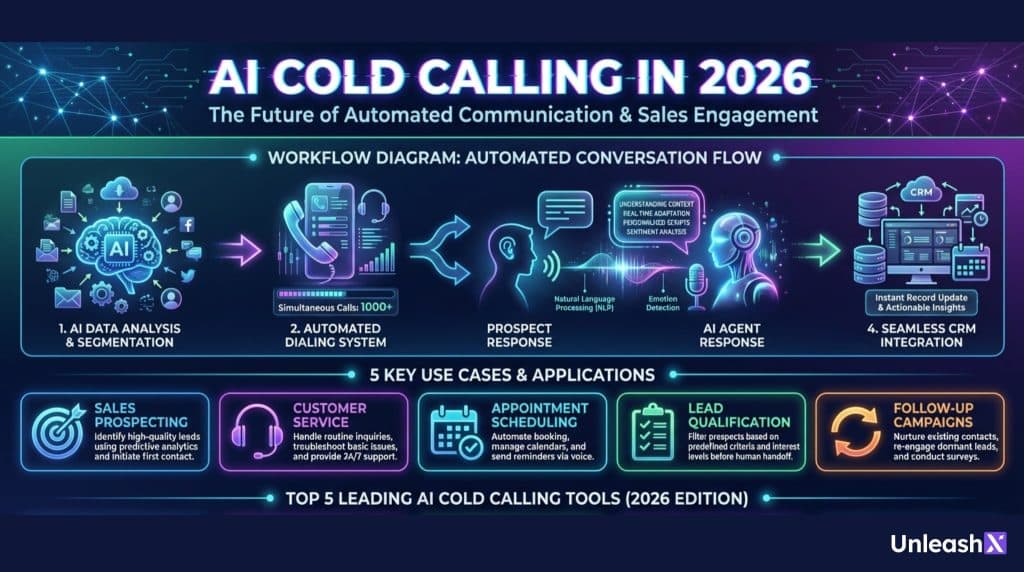
If your team still thinks cold calling is just ?dial, pitch, repeat,? 2026 probably feels confusing. Calls are still happening, but the work around them has changed. An ai calling bot can prep the rep, place calls, follow a tight script, listen for intent, and log the outcome, often without someone typing a single note.
Sales, revenue, and operations teams care for practical reasons: more coverage per day, faster routing to the right specialist, and heavier compliance and quality pressure. The goal isn?t to replace sales reps or agents. It?s to keep calls consistent, reduce missed follow-ups, and avoid risky improvisation.
In plain terms, ?AI cold calling? means AI helps you prep, talk, listen, and log. This guide explains how it works end to end, real-world use cases, and five tools to consider.
How an ai calling bot works in 2026, from lead list to booked meeting
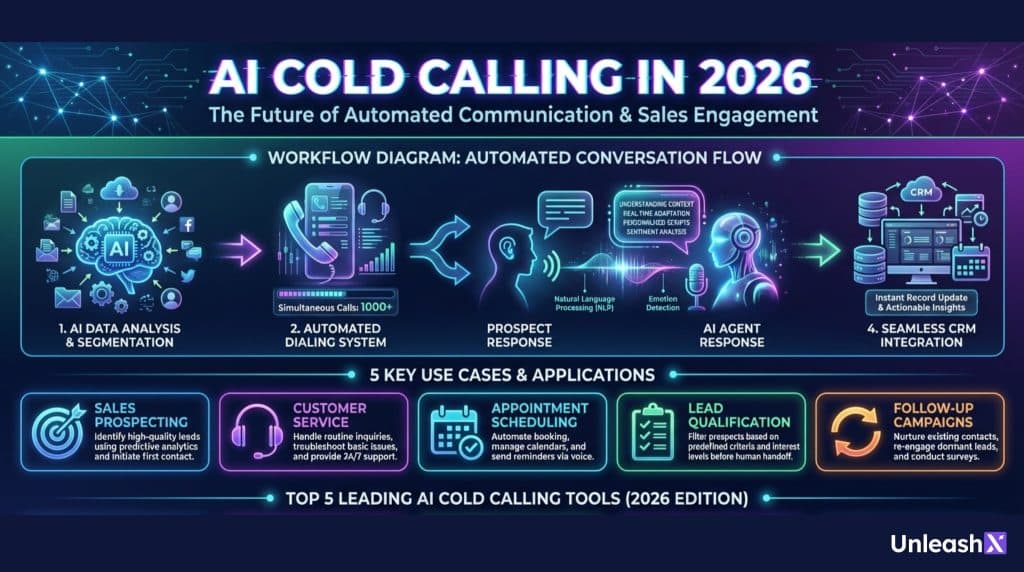
A modern ai calling bot is best understood as a controlled workflow, not a free-form conversationalist. Picture a relay race: data hands off to calling, calling hands off to logging, and humans step in when the topic gets sensitive.
The flow usually looks like this: before the call, the system builds context and rules. During the call, it follows a talk track and listens for signals. After the call, it writes everything down, schedules next steps, and feeds reporting.
Across industries, the use cases are familiar: outbound calls for a pre-qualified offer, a product eligibility check-in, a renewal reminder, or a missed payment courtesy call. The AI part isn?t magic, it?s consistency at scale.
One warning sign: ?cold calling? still rises or falls on targeting. If your list has wrong numbers, stale segments, or missing consent flags, the bot will simply hit those problems faster. Clean data is not optional, it?s the difference between booked meetings and angry complaints.
Before the call: data, intent signals, scripts, and guardrails
Before dialing, the system pulls in context from the CRM and call platform, often including name, product eligibility, last contact date, lead source, time zone, and prior outcomes (no answer, requested callback, not interested). Teams also add compliance fields such as consent status, do-not-call logic, and region-specific disclosure needs.
Many setups also score ?intent? using lightweight signals: recent site visits, an opened email, a form fill, or a recent inbound support case. The goal is simple, call the right person at the right time, with the right message.
This is also where scripts and boundaries get set. Regulated or quality-sensitive teams typically lock approved phrases, safe topics, and identity checks (for example, what can be said before verification). You can usually choose a voice and language, but human review of scripts still matters, because a small wording change can create a big compliance headache.
During the call: real-time listening, talk tracks, and when to hand off to a human
During the call, the ai calling bot converts speech to text, detects intent, and picks the next best line from an approved set. Think of it like a call center rep with perfect memory and no keyboard, but only as smart as the guardrails you give it.
A common talk track follows a predictable pattern: greeting, quick disclosure, a permission check (?Is now a bad time??), a short value line, a few qualification questions, then a clear next step such as booking an appointment.
In high-stakes or complex conversations, handoff rules matter as much as the pitch. Strong triggers include: detailed questions about pricing or terms, eligibility disputes, a complaint or threat to escalate, fraud or trust concerns, or any direct request like ?Let me speak to a person.? Good systems make the transfer fast, with a summary of what was said and why the call is being passed.
Call quality still shows up in human ways. If the bot talks over people, reacts too slowly, or never pauses naturally, trust drops fast. The best pilots focus on the basics: timing, interruptions, and clear confirmation questions.
After the call: notes, outcomes, follow-ups, and learning loops
Once the call ends, the system logs a clean record into your CRM: summary notes, key fields captured, and a tagged outcome such as no answer, wrong number, callback requested, qualified lead, or not eligible. That tagging is what turns thousands of calls into a manageable pipeline.
Follow-ups can also be automated, but teams need to treat consent like a first-class rule. If the customer agreed to SMS or email, the bot can send a confirmation, a link to book time, or a document checklist. If they didn?t, the system should stop, even if the script ?would work better? with one more message.
The learning loop is where AI earns its keep. Managers can review which openers get permission to continue, which objections repeat (pricing sensitivity, trust, timing), and which segments convert. Teams then update scripts and routing rules. For regulated or customer-sensitive environments, audit trails and retention policies matter too, because you may need to show what was said, when, and under which approved version of the script.
Top 5 AI cold calling tools in 2026, and how to choose one
Choosing an ai calling bot is less about the fanciest demo, and more about whether it behaves under pressure. A pilot should prove three things: it sounds acceptable to real customers, it stays inside your rules, and it produces clean data your team can act on.
The five tools below come up often in 2026 evaluations: UnleashX, SquadStack AI, Lyzr AI, Relevance AI, and Retell AI. Rather than assume identical features, treat them as starting points for a structured trial. During evaluation, insist on seeing security controls, integrations, reporting, and the full handoff experience.
Pricing also deserves a real test, because voice minutes, transcription, and telephony can add up quickly. If you?re estimating costs, start with a calculator or usage model such as the UnleashX cost estimator for calls and compare that against your expected call volume and average handle time.
Comparing AI Cold Calling Tools: What You Get, What You Don?t
| Feature / Capability | UnleashX | SquadStack AI | Lyzr AI | Relevance AI | Retell AI |
|---|---|---|---|---|---|
| AI-powered outbound calling | Yes | Yes | Yes | Limited | Yes |
| Scripted & guardrail-based conversations | Yes | Yes | Yes | Yes | Partial |
| Real-time speech-to-text & intent detection | Yes | Yes | Yes | Partial | Yes |
| Human handoff with call summary | Yes | Yes | Configurable | Limited | Partial |
| CRM auto-logging (notes, outcomes, fields) | Deep & native | Campaign-level | Custom-built | Workflow-based | Requires setup |
| Compliance & consent controls | Strong | Strong | Configurable | Depends on setup | Limited |
| Multilingual & accent support | Yes | Limited | Yes | Limited | Yes |
| Call outcome tagging & analytics | Yes | Yes | Yes | Yes | Basic |
| Workflow automation after calls | Yes | Partial | Yes | Yes | No |
| Voice quality & latency control | High | Medium | Medium | Medium | High |
| Custom agent building | Yes | No | Yes | Yes | Yes |
| Pricing transparency | High | Medium | Medium | Medium | Low |
| Best suited for | End-to-end AI calling + workflows | Assisted outbound operations | Custom AI workflows | Ops-driven automations | Voice UX experimentation |
A simple buying checklist: tests to run before you commit
- Disclosure script test: Verify required disclosures happen at the right time, with the right wording.
- Do-not-call handling: Confirm suppression lists are enforced and logged, even during retries.
- Multilingual accuracy: Test two accents per language, not just ?happy path? speakers.
- Latency and interrupt handling: Measure talk-over rate and time-to-respond on real networks.
- Call recording and storage options: Validate where recordings live, who can access them, and retention rules.
- CRM logging accuracy: Audit 50 calls, check notes, outcomes, and fields for errors.
- Human handoff speed: Time the transfer, and confirm the agent receives a usable summary.
- Red-team prompts: Try to push the bot off-script (pricing guarantees, personal data) and see if it refuses safely.
A practical pilot plan: run 2 weeks with a small list, clear success metrics (connect rate, qualified rate, complaint rate, handoff rate), and a daily review with sales and compliance.
Conclusion
AI cold calling in 2026 works best when it?s treated as a controlled system, not a bot that can say anything. The strongest results come from clean lists, strict scripts, fast human handoffs, and careful logging. Pick one use case, run a short pilot, and tighten guardrails before you scale.
If you?re evaluating an ai calling bot, shortlist these 5 tools, test them against real compliance scenarios, and bring compliance into the process early. The question to end on is simple: can this system earn trust on the toughest calls, not just the easy ones?