
The core tension is clear: AI voice assistants promise conversational, real-time engagement, but Salesforce's architecture built around structured objects, permission layers, and workflow rules creates friction that generic voice tools weren't designed to handle. A typical voice bot might read a contact record, but it can't advance an opportunity stage mid-conversation or log call notes while the prospect is still speaking.
This article unpacks the specific challenges that make voice-to-Salesforce integration far more complex than a simple API connection: latency accumulation across processing chains, CRM data sync accuracy failures, multilingual gaps, compliance risks, and human handoff failures. Each demands a dedicated solution, not a quick bolt-on.
Key Takeaways
- Most AI voice tools connect to Salesforce at a surface level, handling read-only lookups rather than executing full CRM workflows during live calls
- Chained processing steps like ASR, NLU, CRM API queries, and TTS push latency past 2,000ms, well beyond conversational thresholds
- Voice transcription errors propagate directly into Salesforce records, corrupting lead, contact, and opportunity data without validation layers
- Multilingual support breaks down when CRM language settings conflict with ASR model gaps in regional accent coverage
- Unmanaged voice-to-CRM pipelines expose regulated industries to GDPR, DPDP Act 2023, and IRDAI compliance risk
The Layered Architecture Problem: Why Voice + Salesforce Integration Is Never One Step
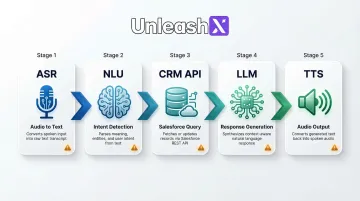
Every voice turn in a conversation requires a full processing chain: Automatic Speech Recognition (ASR) converts audio to text, Natural Language Understanding (NLU) identifies intent, the CRM API queries Salesforce for context, a Large Language Model (LLM) generates a response, and Text-to-Speech (TTS) renders audio. Each layer is a potential failure point.
The Point Solution Trap
Most voice vendors offer Salesforce connectivity via REST API, but this is typically a read-only or single-object lookup. The integration can retrieve a contact record or search for an account, but it can't create leads, update opportunity stages, log call notes, or trigger flows mid-conversation, the exact capabilities needed for true CRM automation.
Why shallow integration fails:
- Voice bots retrieve data but don't write back autonomously
- API calls happen post-call rather than during the conversation
- No bidirectional sync means lost opportunities to act on buying signals in real time
- CRM workflows remain disconnected from voice interactions
Permission Model Complications
Salesforce's permission model (profiles, sharing rules, field-level security) complicates API access for voice agents. A misconfigured connected app can silently return incomplete data, causing the voice assistant to give wrong answers without surfacing an error.
Best practices call for using the "Minimum Access - API Only Integrations" profile and extending access via permission sets. Field permissions control whether a user can view or edit each field on an object. If the voice AI's connected app lacks those permissions, it simply won't see critical data and it won't tell you why.
Common permission gaps that break voice integrations:
- Integration user missing field-level read access on key objects
- Sharing rules that restrict record visibility by territory or role
- Connected app scopes too narrow to support write-back operations
The Context Continuity Problem
Without a persistent session layer (WebSocket rather than HTTP), each voice turn is stateless. The AI must re-fetch Salesforce context on every exchange instead of carrying it through the call, multiplying API calls and adding latency.
Voice agents built outside Salesforce's native ecosystem compound this problem. They miss Data Cloud, Flow automation, and Einstein enrichment, the features that tie responses to unified customer profiles and predictive signals. Without those connections, the layered architecture delivers technically correct answers that still feel generic.
Latency and Real-Time Response: The Speed Tax of Every API Call
Latency is uniquely damaging in voice versus text. Research shows humans detect pauses above 200ms as unnatural in spoken conversation. Gaps over 300ms decrease the likelihood of an unqualified acceptance, and users evaluate waiting experiences negatively when response delays exceed 8 seconds.
Where Latency Accumulates
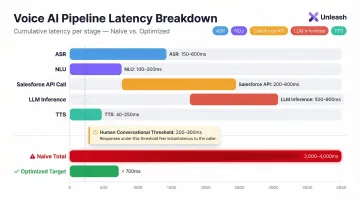
Typical latency breakdown in a Salesforce-integrated voice call:
| Pipeline Stage | Typical Latency | Example Provider |
|---|---|---|
| ASR processing | 150-600ms | Deepgram Nova-3: 150-300ms; Google Chirp: 300-600ms |
| NLU intent classification | 100-300ms | Varies by model complexity |
| Salesforce API round-trip | 200-800ms | Includes authentication token refresh |
| LLM inference (TTFT) | 500-900ms | Claude Haiku: 597ms; GPT-4.1: 889ms |
| TTS generation (TTFA) | 40-250ms | Cartesia Sonic: ~40ms; Inworld: <250ms |
Total end-to-end latency: 2,000-4,000ms in naive implementations far beyond the 200-300ms threshold for natural conversation.
Salesforce API Overhead
The Salesforce API round-trip is also the most variable stage in the pipeline and the hardest to predict under load.
Salesforce imposes API governor limits and rate throttling. When requests reach the rate limit, the API returns an HTTP 429 "Too Many Requests" response with a Retry-After header. Under high call volume, API calls queue and spike latency unpredictably mid-conversation rather than consistently.
The Daily API Request Limit is a soft cap. If requests continue climbing, a system protection limit kicks in blocking subsequent calls and returning an HTTP 403 status code with a REQUEST_LIMIT_EXCEEDED error.
Architectural Mitigations
Strategies to reduce latency:
- Parallel processing : Kick off CRM lookups while intent classification runs
- Smaller specialized language models (SLMs) : Use topic routing models instead of large general-purpose LLMs
- TTS caching : Cache common phrases to eliminate generation time
- Semantic endpointing : Eliminate fixed-pause waiting by detecting sentence completion
- WebSocket connections : Maintain persistent sessions to avoid repeated authentication overhead
The platforms that hit sub-second response times treat the voice pipeline and CRM integration as a single co-designed system not two components bolted together as separate systems. UnleashX operates at under 700ms end-to-end by optimizing the entire stack for real-time CRM interaction, rather than layering a voice layer on top of a generic Salesforce connector.
CRM Data Sync and Record Accuracy: Where Voice Intelligence Meets Salesforce Reality
ASR models convert speech to text with varying accuracy depending on audio quality, accent, and domain-specific terminology. Even the best models show Word Error Rates (WER) of 4-7% on clean English audio. These errors flow directly into Salesforce fields if no validation layer exists.
The Transcription-to-Record Gap
ASR accuracy benchmarks:
- Whisper Large v3: 7.44% WER (average across datasets)
- Deepgram Nova-3: 4-6% WER (clean English)
- Google Cloud STT (Chirp): 4-7% WER (clean English)
A 5% error rate means 1 in 20 words is wrong. When those words are product names, policy numbers, or account names, they corrupt CRM data at scale. Poor data quality costs organizations at least $12.9 million (approximately ₹107.1 crore) per year on average, and CRM duplication rates reach up to 20% due to inconsistent data.
The Field Mapping Challenge
Spoken intent ("I want to update my quote") doesn't map reliably to Salesforce objects and fields (Quote object, Stage picklist, Amount field). The AI must interpret and translate natural language into structured CRM writes and ambiguity leads to incorrect or incomplete records.
Common mapping failures:
- Caller says "next month" but AI writes a specific date that's wrong
- Product names are misheard and mapped to incorrect SKUs
- Contact emails are transcribed with errors (e.g., "at" instead of "@")
- Opportunity amounts are misunderstood due to number formatting differences
Real-Time vs. Post-Call Sync
Many integrations log call data only after the call ends, losing the ability to trigger mid-call workflows. For example:
- Escalating a lead to "Hot" based on spoken buying signals
- Creating a follow-up task while the prospect is still on the line
- Advancing an opportunity stage when the caller commits verbally
- Triggering a discount approval workflow during negotiation
Post-call sync means these opportunities are lost.
Hallucination Risk
Beyond timing, there's a data integrity problem: generative AI components can infer or "fill in" CRM fields with plausible but incorrect values when speech is ambiguous. Even fine-tuned models show hallucination rates that compound across high call volumes meaning errors don't stay isolated, they accumulate in your records.
Example hallucinations:
- Writing a wrong product SKU when the caller's pronunciation is unclear
- Inventing a contact email when the caller doesn't provide one
- Guessing an opportunity amount based on context rather than explicit confirmation
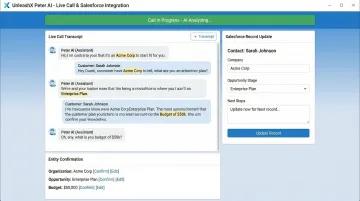
Solving this requires structured entity confirmation before any data is written not after. UnleashX's Peter, a Sales AI Employee, takes this approach by confirming extracted entities in real time during calls before committing them to Salesforce, reaching 98% record accuracy. A Human In Loop layer adds a second check, keeping AI speed intact while giving teams oversight on ambiguous or high-stakes writes.
Multilingual Support: Where Salesforce Language Settings and Voice AI Diverge
Salesforce offers three levels of UI language support: fully supported languages (18 languages), end-user languages (17 languages), and platform-only languages (over 60 languages). This support is strictly for translating custom picklist values, custom fields, and UI text, it does not equate to ASR model language coverage.
The ASR Language Gap
Salesforce can display records in French, but if the voice AI's ASR model wasn't trained on French audio data, it will misrecognize speech regardless of the CRM's language configuration. The two systems operate independently:
- Salesforce Translation Workbench: Translates UI elements and field labels
- ASR Model Training Data: Determines what spoken languages the voice AI understands
A Salesforce instance configured for French UI doesn't automatically enable French speech recognition.
Accent and Dialect Disparities
Even within a single language, significant ASR accuracy drops occur for regional accents. ASR systems exhibit substantial racial disparities, with an average WER of 0.35 for Black speakers compared with 0.19 for white speakers, an 84% increase in error rate.
Regional accent challenges:
- North Indian English vs. South Indian English variants
- Bengali-influenced English vs. Marathi/Gujarati-influenced English
- Indian English vs. British English
- Hinglish (Hindi-English) code-switching patterns
Code-Switching and Low-Resource Languages
Callers frequently mix languages (for example, Hinglish, a Hindi-English blend). ASR systems experience a 30-50% relative increase in WER when transcribing code-switched speech compared to monolingual speech.
For businesses targeting markets in South Asia, Southeast Asia, or Africa, this gap is a real operational risk. Low-resource languages compound the problem further:
- Malayalam: Baseline ASR models exhibit a WER exceeding 100% due to high insertion errors rendering standard models unusable without specialized training data.
- Code-switched speech (Hinglish, Taglish, Singlish): WER climbs 30-50% above monolingual baselines
- Underrepresented dialects: Most commercial ASR models are skewed toward high-resource language variants, leaving regional speakers underserved
UnleashX addresses this gap directly supporting 100+ languages and 12+ Indian languages including Tamil, Bangla, and regional vernaculars that standard Salesforce voice integrations leave uncovered.
Compliance, Security, and Data Privacy in Voice-to-CRM Pipelines
Callers routinely speak sensitive information like credit card numbers, national IDs, policy details, health data into the call stream. Without a PII detection and masking layer, raw transcripts passed directly to Salesforce expose that data in CRM records putting your organization in breach of GDPR, DPDP Act 2023, or IRDAI regulations. Each framework defines its requirements differently.
PII Exposure Risk
Regulatory definitions of sensitive voice data:
- DPDP Act 2023 (US): 45 CFR 160.103 defines Protected Health Information (PHI) to include oral information and biometric identifiers such as voice prints
- GDPR (EU): Article 32 mandates processing in a manner that ensures appropriate security of personal data
- IRDAI (India): Data residency rules require that all policy records including call data be stored in centers located and maintained within India
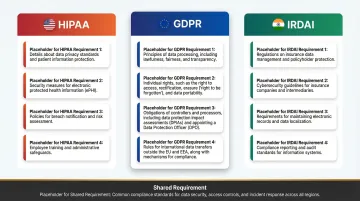
Enforcement example: The Warsaw Centre for Intoxicated Persons was fined PLN 10,000 (approx. €2,200) for recording audio without a legal basis under GDPR Article 7.
Consent and Data Retention
Voice calls must comply with India's call recording consent laws. Under India's Digital Personal Data Protection Act, 2023 and the Information Technology Act 2000, explicit informed consent is required before recording personal data including voice. TRAI's Commercial Communications regulations additionally mandate a beep-tone notification at the start of any recorded call.
The AI integration must:
- Capture consent at the start of the call
- Log consent preferences in Salesforce contact records
- Honor opt-out requests and delete recordings accordingly
- Maintain consent audit trails for compliance reviews
Consent capture is only the first layer. Regulated industries also require a verifiable record of every action the AI took not just that a call happened, but what was said and what changed in Salesforce as a result.
Audit Trail Requirements
Regulated industries (insurance, banking, financial services) require a complete, tamper-evident log of what the AI said and did during a call, including any Salesforce records it created or modified.
MiFID II (EU): Article 16(7) of Directive 2014/65/EU requires investment firms to record telephone conversations or electronic communications that are intended to result in transactions. Records must be retained for at least the duration of the relationship with the client.
UnleashX addresses this with 100% Compliance Monitoring across IRDAI, GDPR, and internal audit protocols, every voice interaction is logged, traceable, and linked to the corresponding Salesforce record it created or modified.
Human-to-AI Handoff and Escalation: The Context Loss Problem
When a voice AI call escalates to a human agent in Salesforce Service Cloud, the typical failure mode is context loss. Without a live transcript piped into the agent console, the human has no visibility into what was discussed, forcing the customer to repeat themselves.
Customer Frustration
97% of consumers state it is important to be able to move from one channel to another without having to repeat information. Yet most voice AI handoffs fail this basic requirement.
Incomplete Case Creation
If the AI creates a Salesforce case mid-escalation but the transcript, sentiment signal, and conversation summary aren't attached to that record at transfer time, the receiving agent is starting cold despite the AI having gathered qualifying information.
Here's what that gap actually costs the handoff:
- Full conversation history and context
- Detected sentiment and emotional state
- Specific issues or requests mentioned
- Customer verification steps already completed
- Products or services discussed
What a Well-Designed Handoff Requires
Essential handoff capabilities:
- Real-time transcript streaming to the agent desktop before transfer completes
- Automated case creation with conversation summary and detected sentiment attached
- Configurable escalation triggers such as specific keywords, negative sentiment thresholds, or request type
- Supervisor monitoring without interrupting the active call
- Full context transfer so the receiving agent sees exactly what the AI gathered
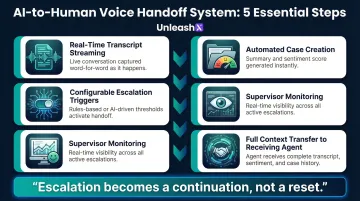
All of these require tight, purpose-built Salesforce integration rather than afterthought API connections. Platforms like Salesforce Agentforce Voice address this by passing full conversation history and customer context to the live agent the moment a query exceeds the AI's scope turning escalation from a reset into a continuation.
Frequently Asked Questions
How do AI voice agents handle Hindi and regional languages for Indian customers?
Modern voice AI platforms support natural conversations in Hindi, Tamil, Telugu, Kannada, Marathi, Bengali, and code-mixed Hinglish. UnleashX voice agents detect caller language automatically, switch mid-call where needed, and integrate with WhatsApp for follow-ups, which matches how Indian buyers in BFSI, real estate, and D2C actually engage.
What are the limitations of voice AI?
Voice AI struggles with background noise, accent-related transcription errors, and latency stacking across the ASR → NLU → LLM → TTS pipeline. It also can't interpret silence or non-verbal cues, and risks hallucinating when input is ambiguous. All of these risks compound when the AI is simultaneously reading from and writing to a live CRM.
Which Indian companies are deploying AI voice agents in production?
Indian BFSI majors (HDFC, ICICI, SBI, Axis), real estate firms, lending NBFCs, and D2C brands are running voice AI in production for sales calls, KYC follow-ups, and customer support. NASSCOM has tracked rapid adoption across IT services and BPO firms (TCS, Infosys, Wipro, HCLTech) building voice AI practices for Indian and pan-India enterprise clients.
How do AI voice assistants handle Salesforce authentication and data security during calls?
Secure integrations rely on OAuth 2.0 connected apps, Named Credentials for token management, and field-level security to limit CRM data exposure. PII spoken during calls must also be masked before being written to Salesforce to satisfy GDPR, DPDP Act 2023, and other compliance requirements.
What is a realistic latency target for AI voice + Salesforce integrations?
Sub-700ms end-to-end response time is the practical target for natural conversation. Achieving it requires parallelizing CRM API calls with intent classification, using SLMs for routing rather than large general-purpose models, and caching common Salesforce query results rather than making live API calls on every voice turn.
What Indian regulations should I consider before deploying voice AI?
DPDP 2023 governs personal data handling in voice interactions, including consent capture and audit trails. RBI guidelines on outsourcing apply to BFSI deployments, IRDAI rules cover insurance workflows, and TRAI's commercial communication rules govern outbound calling. Production-grade voice AI platforms maintain call recordings, language logs, and consent receipts to meet these requirements.