
Introduction
AI voice agents now handle inbound qualification, outbound follow-ups, and appointment booking autonomously, yet most HubSpot users still rely on manual call logging and disconnected telephony systems. The result: data gaps and slow response times that drain pipeline.
Sales reps spend 25-28% of their workweek (roughly 10-11 hours) on manual CRM data entry alone. Meanwhile, the average B2B lead response time sits at 42-47 hours even though MIT research shows that calling within 5 minutes increases connection odds by 100x.
Connecting a voice AI to HubSpot sounds straightforward but results vary sharply based on workflow design, field mapping accuracy, call script logic, and platform selection. Teams that skip preparation hit data inconsistencies, broken workflows, and degraded conversation quality within weeks of launch.
This guide covers the exact setup decisions that separate integrations delivering measurable pipeline lift from ones that stall in configuration.
Key Takeaways
- AI voice agents automate inbound qualification, outbound follow-ups, and CRM updates in HubSpot only when the integration is deliberately designed
- Successful integrations need pre-mapped workflows, authenticated APIs, accurate field mapping, and human escalation protocols from day one
- Common failure points: treating the AI like an IVR, skipping field mapping, and launching without end-to-end QA testing
- Top performance gains come from trigger-based outbound automation, real-time call logging, and analytics-driven script retraining
What You Need Before Integrating AI Voice Agents with HubSpot
The quality of a voice AI + HubSpot integration is determined by preparation, not technology. Teams that skip this phase face data inconsistencies, broken workflows, and poor conversation quality post-launch.
Platform and Technical Requirements
Your core technical stack requires three components:
- HubSpot API connectivity : native integration, middleware like Zapier or Make, or custom REST API calls
- Telephony layer : SIP-based or programmable voice infrastructure
- Speech engine : STT/TTS capable of sub-700ms response latency to avoid unnatural conversation pauses
Human conversation operates on a 200-300ms response window, a timing hardwired into human communication. Delays exceeding 1 second trigger neurological stress responses and cause users to assume connection failure. Yet the industry median for production voice AI currently sits at 1.4-1.7 seconds, 5x slower than human expectation.
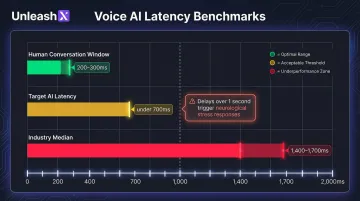
Latency, then, is often the deciding factor in platform selection. Some platforms, such as UnleashX, ship pre-built AI employees like Peter, their Sales AI Employee that are CRM-ready out of the box and go live in as little as 45 minutes, removing the need to stitch together multiple tools.
HubSpot Setup Readiness
Before integration, ensure these HubSpot objects and properties exist:
- Contact lifecycle stages
- Deal pipeline stages
- Call activity properties
- Custom fields for call outcome, qualification status, and next steps
Unmapped fields mean data is silently lost after every AI interaction. Confirm HubSpot API access is enabled with the right permission scopes granted (contacts, engagements, deals, workflows). Missing scopes are one of the most common causes of incomplete call logging.
Compliance and Consent Readiness
Verify that outbound call compliance requirements are addressed before launch. The 2024 FCC ruling applies TCPA restrictions to AI-generated voices, while the FTC Telemarketing Sales Rule mandates 5-year recordkeeping and strict abandoned call limits.
Build these into call scripts and data handling logic now, not after go-live:
- Call recording disclosures
- Opt-out handling
- GDPR data retention limits
- Industry-specific mandates (e.g., IRDAI for insurance, RBI guidelines for banking)
How to Integrate AI Voice Agents with HubSpot CRM: Step by Step
Step 1: Define Use Cases and Map HubSpot Workflow Triggers
Document the exact scenarios where AI voice will replace or support human outreach. Examples:
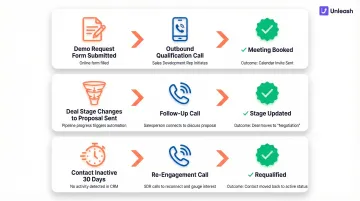
- Trigger an outbound call when a lead submits a demo request form
- Trigger a follow-up call when a deal stage changes to "proposal sent"
- Trigger a re-engagement call when a contact has been inactive for 30 days
Map each trigger event in HubSpot Workflows to a specific AI call action and define what success looks like a booked meeting, an updated lifecycle stage, a qualified or disqualified tag. These measurable checkpoints determine whether the integration is working, not just running. Document which calls require human handoff, and at what point in the conversation, before any script or workflow is built.
Step 2: Select and Configure Your AI Voice Agent Platform
Choose a platform based on:
- HubSpot API compatibility
- Latency benchmarks (target under 700ms for natural conversation)
- Language support requirements
- Bidirectional data sync the platform must read contact data from HubSpot before each call and write outcomes back after
Configure the AI agent's conversation logicto match the intent of the HubSpot workflow stage that triggered the call. This includes:
- Greeting scripts tailored to the trigger context
- Qualification questions mapped to HubSpot lead scoring fields
- Objection handling paths and escalation triggers
Step 3: Set Up the Integration and Authenticate APIs
Connect the voice platform to HubSpot using the appropriate method: native integration (if available), middleware connector, or direct REST API calls using HubSpot's Engagements API and Contacts API. Authenticate with a private app token scoped to only the necessary permissions.
Verify that the integration supports bidirectional sync: the voice agent reads contact data from HubSpot before the call (for personalization) and writes call outcomes, transcripts, and updated properties back to HubSpot after the call completes.
Run a sandbox test with a dummy contact record to confirm data flows correctly end-to-end. Only after this validation should you connect the integration to live workflows and proceed to field mapping.
Step 4: Configure CRM Field Mapping, Test Call Flows, and Deploy
Map every AI-captured data point to a specific HubSpot field:
- Call outcome maps to the corresponding contact property
- Qualification answers feed directly into lead score inputs
- Booked meetings log as HubSpot engagements in the contact timeline
- Next steps generate a task, assigned automatically to the deal owner
Conduct end-to-end call flow testing across all trigger scenarios test inbound routing, outbound dial initiation, conversation branching, and CRM sync confirmation before enabling workflows in a live environment.
Set up HubSpot dashboards and AI analytics views to track connection rate, conversation completion rate, qualification accuracy, and CRM data completeness from day one of deployment.
Best Practices That Determine Integration Success
Voice AI integrations fail not from bad technology but from poor operational design. These five practices separate integrations that move pipeline from those that pollute it.
Build Human Handoff Into the Call Logic Not as an Afterthought
Define explicit escalation triggers in the AI's conversation flow. When any of the following occur, the AI should transfer immediately to a live rep:
- Prospect asks for pricing or makes a purchase decision
- Strong buying intent detected (urgency signals, budget confirmation)
- Complex objections the script cannot resolve
- Direct request to speak with a human
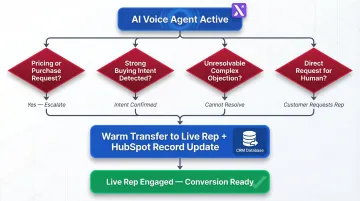
At the moment of transfer, the AI simultaneously updates the HubSpot contact record with the handoff reason, so the rep has full context before picking up.
Map CRM Fields Before the First Call Goes Out
Require a complete field mapping document before any live calls are triggered. Every data point the AI captures qualification score, call intent, next step, sentiment needs a corresponding HubSpot property already created, labeled, and visible in the relevant deal or contact view. Skipping this step means call data lands nowhere useful, and reps are left hunting for context manually.
Optimize Call Scripts Around HubSpot Pipeline Stages
Write distinct conversation flows for each HubSpot pipeline stage rather than using a single generic script. A new inbound lead needs discovery questions. A post-demo follow-up should address specific objections raised in the previous call. A re-engagement call should acknowledge the gap and lead with value before any pitch.
Build Compliance and Consent Flows into Every Script
Three compliance elements belong in every script:
- Recording disclosure: State it at the start of every outbound call, without exception
- Opt-out path: Detect opt-out signals instantly, log the status in HubSpot, and remove the contact from all further AI sequences
- Data retention: Align call data storage with GDPR, IRDAI, and applicable regional regulations
Retrain Call Scripts Using HubSpot Call Analytics
Establish a monthly review cadence: pull HubSpot engagement data and AI call analytics to identify which conversation branches lead to positive outcomes (meetings booked, deals advanced) and which cause drop-offs. Revise underperforming scripts based on actual conversation data not guesswork about what prospects want to hear.
Common Mistakes to Avoid and How to Fix Them
Treating the AI Voice Agent Like an IVR System
Deploying the AI with rigid menu-based logic "Press 1 for sales, Press 2 for support" kills CRM value before the integration even starts. The AI captures no meaningful data, and callers bail.
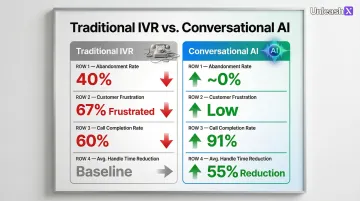
Traditional DTMF IVR systems suffer a 40% abandonment rate and 67% customer frustration, while conversational AI deployments push call completion rates from 60% to 91% and cut average handle time by 55%.
Design conversation architecture around open-ended qualification questions, context-aware responses, and dynamic branching. The agent should sound like a knowledgeable SDR not a phone tree.
Skipping CRM Field Mapping Until After Launch
Launching with placeholder or default HubSpot fields expecting to "clean it up later" is one of the most common integration failures. Call data ends up lost, buried in free-text notes, or duplicated across contacts.
Create and map every required HubSpot property before the first live call. Field mapping is a prerequisite, not a post-launch task.
Launching Without Testing End-to-End Call Flows
Testing only the API connection without walking through actual conversation paths, CRM write-back, and workflow triggers leaves major gaps that only surface after launch.
Before enabling live workflows, run full call simulations across every trigger scenario using internal test contacts. After each test call, verify CRM sync and confirm all fields updated correctly.
Ignoring Human Escalation Design
Building an integration with no escalation path is a deal-killer. High-intent prospects who want a human get stuck in AI loops and most won't try again.
Build escalation in from day one:
- Define triggers explicitly: intent keywords, call duration thresholds, direct requests
- Configure warm transfer protocols so handoffs don't feel like hang-ups
- Ensure the receiving rep gets a CRM briefing before picking up the call
Troubleshooting Common Integration Issues
Even well-configured integrations hit friction during early deployment. When something breaks, it's rarely random the failure usually traces back to API permissions, conversation timing, or how the integration handles existing CRM records.
CRM Data Not Updating After Calls
The most common culprit is missing API permission scopes or the HubSpot Engagements API being called before the call fully completes, which produces partial or null data writes.
Check these three things:
- Confirm the private app token includes write access to Contacts, Engagements, and Deals
- Verify the CRM sync function triggers on call completion, not call initiation
- Review HubSpot's API call log for 4xx errors flagging permission or field mismatch issues
High Drop-Off Rates During AI-Led Conversations
Drop-offs usually happen in the first 30 seconds. The opening script may feel too scripted, latency above 700ms creates unnatural pauses, or qualification questions hit before the caller has any context.
Start here:
- Review call recordings to identify exactly where callers are disconnecting
- Test end-to-end latency under real network conditions (not just local staging)
- Rework the opening 30 seconds to lead with warmth and context before moving into qualification
Duplicate Contact Records Being Created in HubSpot
This happens when the integration creates a new contact on every call instead of checking whether a record already exists typically because there's no deduplication lookup using email or phone as the primary identifier.
Two fixes to apply:
- Ensure the integration queries HubSpot's contact search API by email or phone before creating any new record
- Enable HubSpot's native deduplication settings as a secondary fallback for records that slip through
Conclusion
The technical connection between your AI voice agent and HubSpot is just the starting point. What actually drives results is what you build around it the field mapping logic, conversation flows, escalation rules, and data hygiene practices that make every call actionable.
Teams that get this right early tend to see faster lead response times, cleaner CRM data, and more consistent pipeline progression.
The pattern behind most integration failures is the same: skipped preparation, not broken technology. Before deploying, nail down:
- Field mapping: Know exactly which call data lands where in HubSpot
- Escalation logic: Define when the AI hands off and what context it passes
- Conversation architecture: Build flows that match how your prospects actually respond
- Ongoing review: Treat the integration as a living system, not a one-time setup
Design those four elements with intention, and the AI-HubSpot stack becomes a genuine revenue asset not just an automation layer.
For Indian businesses operating across BFSI, IT services, real estate, insurance, and Voice AI workflows, the same pattern applies: multilingual coverage across English, Hindi, and regional languages, WhatsApp-first customer engagement, and compliance with RBI, IRDAI, and DPDP 2023 requirements together determine production-grade success.
Frequently Asked Questions
How do AI voice agents handle Hindi and regional languages for Indian customers?
Modern voice AI platforms support natural conversations in Hindi, Tamil, Telugu, Kannada, Marathi, Bengali, and code-mixed Hinglish. UnleashX voice agents detect caller language automatically, switch mid-call where needed, and integrate with WhatsApp for follow-ups, which matches how Indian buyers in BFSI, real estate, and D2C actually engage.
How does an AI voice agent automatically update HubSpot contact records after a call?
After each call, the AI platform pushes structured data call summary, qualification outcome, next steps to HubSpot via the Engagements API. This logs the interaction on the contact's timeline and updates contact or deal properties in real time.
Which Indian companies are deploying AI voice agents in production?
Indian BFSI majors (HDFC, ICICI, SBI, Axis), real estate firms, lending NBFCs, and D2C brands are running voice AI in production for sales calls, KYC follow-ups, and customer support. NASSCOM has tracked rapid adoption across IT services and BPO firms (TCS, Infosys, Wipro, HCLTech) building voice AI practices for Indian and pan-India enterprise clients.
What Indian regulations should I consider before deploying voice AI?
DPDP 2023 governs personal data handling in voice interactions, including consent capture and audit trails. RBI guidelines on outsourcing apply to BFSI deployments, IRDAI rules cover insurance workflows, and TRAI's commercial communication rules govern outbound calling. Production-grade voice AI platforms maintain call recordings, language logs, and consent receipts to meet these requirements.
How do you handle calls the AI cannot resolve, what does human handoff look like?
Well-configured AI voice agents use escalation triggers intent keywords, explicit requests, or call duration thresholds to initiate a warm transfer to a live rep. The CRM contact record updates automatically, so the rep has full context before joining the call.
How long does it typically take to go live with an AI voice agent + HubSpot integration?
Timeline depends on platform choice and setup complexity. Pre-built AI employee platforms can go live in under an hour, while custom-built integrations requiring bespoke API work and workflow design typically take several days to a few weeks.